

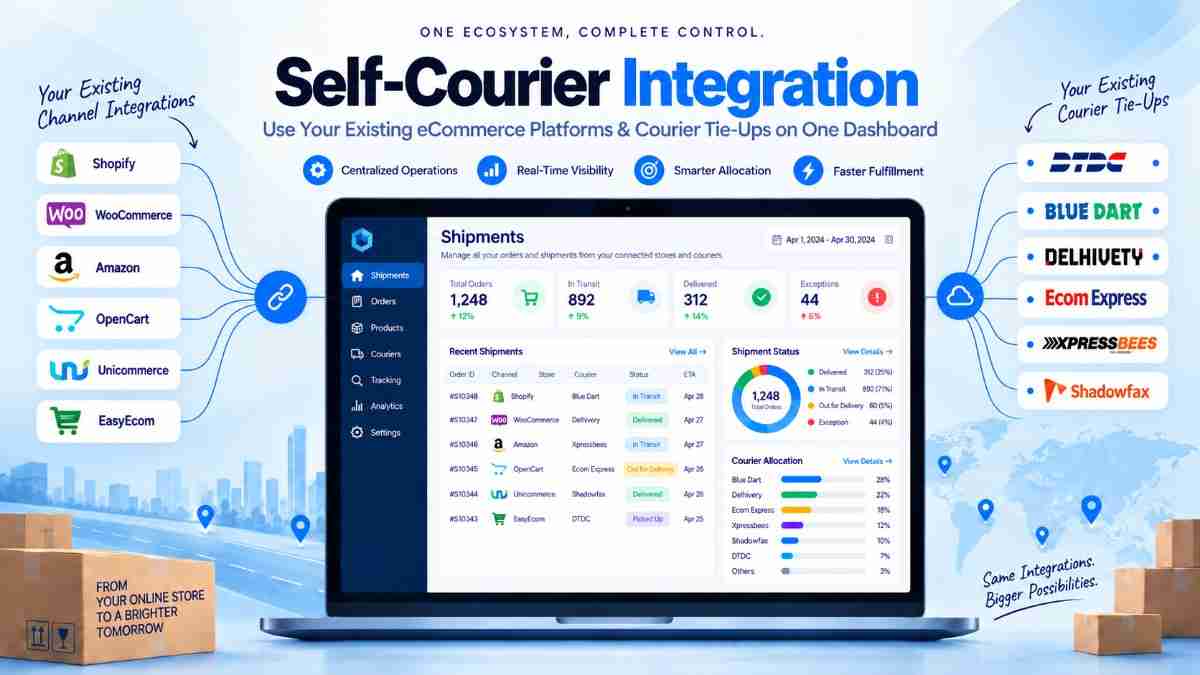
Brands that have negotiated rates, pickup schedules or service commitments with specific courier companies often hesitate to adopt a shipping aggregator. The concern is understandable: moving platforms may appear to mean giving up established courier relationships. Self-courier integration addresses that concern by allowing a business to use its existing courier tie-ups through a unified shipping dashboard.
Instead of managing orders, labels, tracking updates and shipment exceptions separately across courier portals, the seller can bring eligible carrier accounts into one operational workflow. The courier relationship remains with the business, while the shipping technology helps centralise execution and visibility.
This model is particularly relevant for manufacturers, distributors, D2C brands and ecommerce sellers that already work with one or more direct courier partners. It can also support businesses that want to retain negotiated commercial terms while improving how their teams process daily shipments.
This guide explains what the setup means, how it works, where it creates operational value, what teams should verify before implementation and when a blended model using both existing and additional courier options may be more suitable.
For broader context on how a unified platform can simplify fulfilment operations, see this guide to simpler order management.
Self-courier integration is a shipping arrangement in which a business connects its own courier accounts or existing carrier agreements to a logistics platform. The business continues to use its chosen courier partners, but shipment operations are handled from a central dashboard instead of separate carrier systems.
The exact technical setup depends on the courier and the information made available by that carrier. In practical terms, the connected account may support activities such as selecting the courier for an order, generating an airway bill or shipping label, passing shipment details to the carrier, receiving tracking updates and viewing delivery status.
It is important to distinguish this model from a standard aggregator arrangement. In a conventional aggregator workflow, the platform may offer access to courier partners under its own commercial or operational structure. With a self-managed carrier account, the seller brings an existing relationship into the platform and remains responsible for the underlying courier agreement.
The central idea is simple: retain the courier relationship while reducing the number of disconnected tools used by your dispatch, customer support and logistics teams.
Established courier relationships often carry operational value that is not visible in a simple rate comparison. A brand may have a dependable pickup executive, agreed billing cycles, special handling arrangements, destination knowledge or a service process built around that carrier. Replacing the partner can create disruption even if another provider appears attractive on paper.
Direct courier contracts may also be important for businesses shipping consistent volumes from known origin locations. A manufacturer may have scheduled dispatches to distributors, while a D2C brand may have negotiated terms for selected pincodes. In both cases, the courier relationship is part of the operating model, not just a delivery option.
However, direct relationships can become difficult to manage when order volume grows. Teams may need to switch between a store, warehouse software, courier portals, spreadsheets, email threads and customer service tools. This creates avoidable work and makes it harder to establish one reliable view of shipment progress.
A unified connection helps address the technology gap without forcing an immediate commercial change. It gives the business a way to preserve familiar carrier operations while improving the process around them. This is useful for companies evaluating direct courier versus aggregation based on actual workflow requirements rather than assumptions.
The objective is not to remove human oversight. It is to make that oversight more structured and less dependent on fragmented systems.
The strongest benefit is continuity. A business can keep working with carriers it already understands while bringing routine shipment activities into a more consistent process. This matters when the company has already invested time in negotiating rates, training warehouse staff and establishing pickup routines.
Existing courier contracts and negotiated terms can remain part of the shipping strategy. The platform connection does not automatically change the business relationship with the carrier. This allows the seller to pursue process improvement without treating technology adoption as a reason to renegotiate every shipment arrangement.
Dispatch teams can work from a central interface for eligible orders instead of moving between multiple carrier portals. Customer support also benefits from having a clearer reference point when responding to delivery questions, non-delivery reports or return-related queries.
When order information is available in the shipping workflow, teams can spend less time copying names, addresses, package details and payment information between systems. Fewer manual touchpoints can also make it easier to identify errors before handover.
Tracking information from connected courier movements can be viewed in a common workflow. This makes it easier to monitor open shipments, identify stalled statuses and coordinate follow-ups. A delivery tracking process is especially useful when several teams share responsibility for post-dispatch communication.
Businesses do not have to abandon direct couriers to test additional shipping options. They can retain preferred partners for suitable lanes and consider other services where the existing network has a limitation. This creates a more practical transition path than switching the entire network at once.
A central record can help teams review who processed a shipment, what status it carries and which action is pending. The level of audit detail depends on the platform and integration, but a structured workflow is generally easier to review than scattered spreadsheets and portal screenshots.
The implementation should be treated as an operational project, not merely a login exchange. Before connecting an account, document how orders are currently received, packed, handed over, tracked and reconciled. This reveals which parts of the process need standardisation and which carrier-specific rules must be retained.
For teams connecting stores and carriers as part of a broader setup, this shipping integration guide provides useful context on the related workflows.
A successful setup depends as much on governance as on technology. The carrier account should have a clear owner, documented operating rules and a regular review cycle. Without these controls, a central dashboard can still contain inconsistent data or outdated routing decisions.
Define where the courier is preferred, which shipment modes are available and which destinations require an alternative. Do not describe a carrier as suitable for every order simply because it performs well on a few familiar lanes. Segment decisions by product, pincode, weight and delivery requirement.
Standardise warehouse addresses, phone numbers, GST or invoice fields where required, package dimensions and SKU information. Incorrect dimensions can affect billing, while incomplete consignee details can create delivery delays or NDR events. Assign responsibility for correcting recurring data errors.
Booking an order is only the first operational step. Establish a daily review for shipments that were not picked up, have no recent scan, show an NDR or require a reattempt. This prevents teams from assuming that a successfully generated label means the shipment is progressing normally.
Analyse performance at a useful level of detail. A courier may be reliable from one warehouse to a particular region but less suitable for another destination cluster. Review pickup consistency, transit movement, delivery attempts, NDR patterns, RTO movement and claims handling where records are available. The guide on courier performance metrics can help structure this review.
Courier credentials, account contacts, pickup addresses and service permissions can change. Maintain an owner and escalation path for updates. Test the connection after any major account change rather than discovering a problem when orders are waiting to be dispatched.
Define what the warehouse should do if booking fails, tracking is delayed or the courier temporarily stops servicing a destination. A fallback may involve manual booking, a different connected account or a separate service decision. The process should protect dispatch continuity without allowing uncontrolled courier selection.
Businesses often focus on connecting the account and underestimate the process design required around it. Most early problems arise from incomplete information, unclear ownership or unrealistic assumptions about what the integration can control.
Before adding or replacing a courier, review serviceability, packaging requirements, escalation quality and billing practices rather than comparing only the headline freight rate. This courier selection checklist covers the wider evaluation areas.
The right model depends on how much control a business wants to retain and how much of the carrier network it needs to access. There is no universal answer: a brand may use more than one model across warehouses, products or customer segments.
A connected-account approach is usually strongest when the business already has dependable carrier tie-ups and wants to improve workflow control. A broader aggregator model may be more useful when the seller is entering new markets, handling highly variable volumes or needing options across a wider range of pincodes. Businesses can compare these choices with this overview of choosing a shipping aggregator.
Self-courier integration gives businesses a practical way to modernise shipping without discarding courier relationships that already work for their products, lanes or customer commitments. By connecting existing accounts to a central workflow, teams can reduce portal switching, improve shipment visibility and create clearer ownership for dispatch and exceptions.
The setup still requires careful validation. Review account permissions, data fields, serviceability, billing responsibilities and fallback procedures before going live. Test real operating scenarios, including COD shipments, failed pickups, delayed scans, NDR cases and returns.
Shipmozo supports businesses across Self-Courier Integration, B2B Shipping, B2C Shipping and Surface Shipping, helping teams align their existing courier operations with a more organised shipping process. If you are evaluating a central dashboard while retaining your courier tie-ups, explore how the workflow fits your business. Talk to an Expert
It means bringing your own courier account or carrier agreement into a central shipping platform so eligible orders, labels, shipment references and tracking activity can be managed through one workflow. The underlying courier contract remains between your business and the carrier.
No. The purpose of this model is to retain your current courier relationship while improving the way orders and shipment information are managed. You may continue using that carrier for suitable orders and add other options only where your operating requirements demand them.
Depending on the courier’s technical support and your account permissions, the workflow may include shipment booking, airway bill or label generation, pickup requests and tracking updates. Billing, claims, remittance and certain exception processes may still require separate courier coordination.
Run a controlled set of shipments across common and difficult pincodes, different package types and relevant payment modes. Verify data mapping, label output, pickup communication, tracking events, COD handling, cancellation and return-related statuses before expanding to all orders.
It can be suitable when a growing business already relies on direct courier tie-ups but needs a more organised operating workflow. The business should document routing rules, maintain accurate order data, assign exception owners and review carrier performance by lane as volume increases.


Kuldeep Karki is a Digital Marketing Manager at Shipmozo, specializing in performance marketing, SEO, and growth strategy. With over 6+ years of experience in digital marketing, he has worked extensively on scaling B2B and eCommerce brands through data-driven campaigns across Meta Ads and Google Ads.





.webp)